


Organic rank is the position your ASIN holds in Amazon search results for a given keyword, with no ad spend behind it. There are four practical ways to track it: manually in a spreadsheet, with a Chrome extension, with a dedicated rank tracker, or inside a seller suite you already pay for. Whichever you pick, check the same keywords on the same schedule. A lone reading tells you almost nothing. The trajectory tells you everything.
I check rank on Mondays. Same list, same time, coffee in hand. In our experience every method below on live seller accounts before recommending any of them.
What organic rank means on Amazon
Organic rank is your position in search results without paid promotion behind it. Amazon’s algorithm weighs keyword relevance, sales velocity, conversion rate, review signals, and whether you’re actually in stock.
That last one surprises people. Go out of stock and your placement decays fast, then takes weeks to claw back. I’ve watched a top-three keyword slide to page two over a three-week stockout and take two months to recover.
Paid placement is a different system. You can buy the top of the page today and lose it tomorrow when the budget stops. Organic rank compounds instead, which is why it’s worth measuring properly.
Which metrics matter for organic rank
Four numbers are worth your attention. I ignore the rest.
- Keyword-specific rank. Your position for one exact search term. This is the figure people mean when they say “rank.”
- Search visibility. How many of your target keywords put you on page one at all. Page two might as well not exist.
- CTR and conversion rate. Placement gets you seen. These two decide whether Amazon keeps you there.
- Historical trend. Six weeks of direction beats today’s snapshot, always.
Track five keywords per product, not fifty. Dashboards nobody opens improve nothing, and a bloated tracker is the fastest way to stop looking at it.
Four ways to track organic rank
1. Manual checks in a spreadsheet
Search the keyword in an incognito window, find your ASIN, log the position and date. That’s it. No subscription, no setup.
It’s tedious. It’s also free, and I still do it for new products. More importantly, it teaches you which search terms actually matter to your product, because you feel the difference between a term with three competitors and one with three hundred. I’d run manual checks for a week before paying for any tool.
The limits are obvious: no archive unless you build one, no alerts, and it stops scaling past a handful of products. Use incognito or the results skew toward your own browsing.
2. Chrome extensions
Extensions such as Amazon ASIN Keyword Rank & Index Checker pull positions for an ASIN across several search terms and marketplaces at once. Useful metrics include percentage indexed, average page rank, and how many competing products sit in the same results.
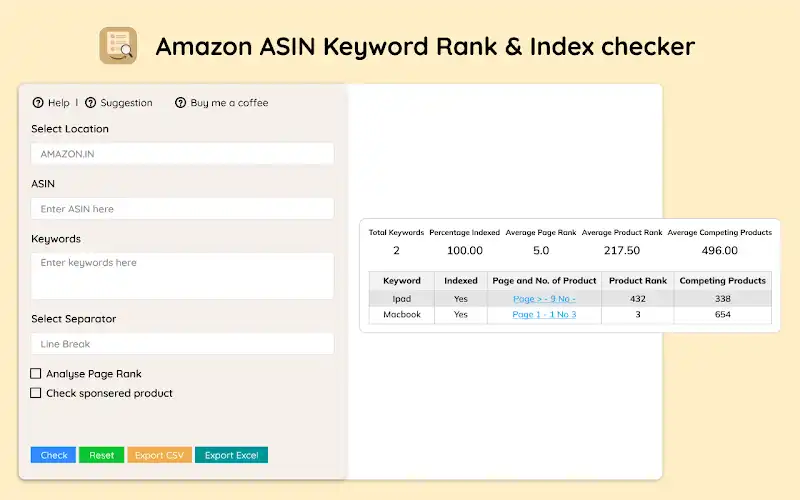
Amazon ASIN Keyword Rank & Index Checker extension
I’ve found extensions cheap, fast, and good enough for a small catalog. What you give up is history: most extensions show you now, not last month. Treat them as a spot check rather than a record.
3. Dedicated rank trackers
Tools like Jungle Scout’s Rank Tracker watch positions daily and archive the history for you.
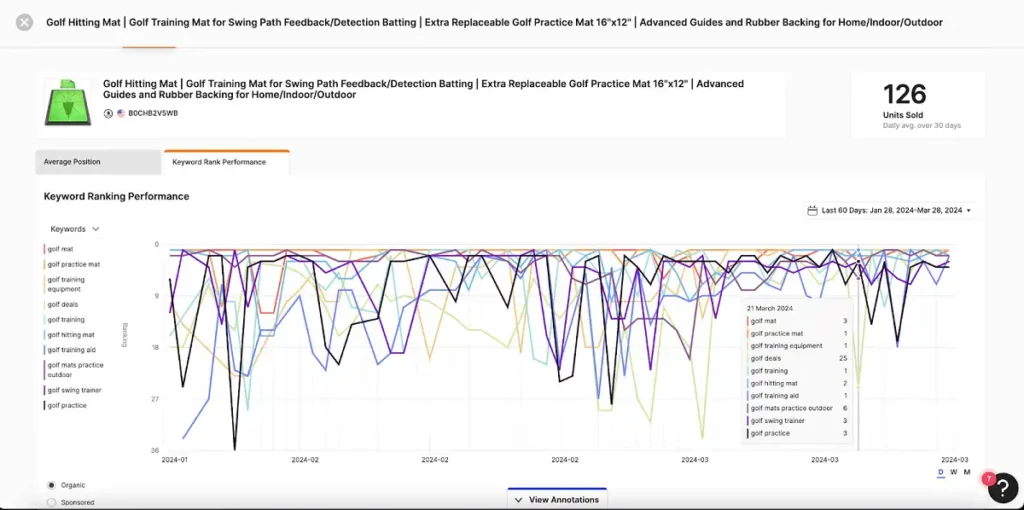
Jungle Scout’s Rank Tracker
What you get for the subscription:
- Historical charts, so you can tie a rank change to the week you edited the listing.
- Competitor monitoring on an identical term set, which is the context that makes your own numbers meaningful.
- Suggested phrases you never thought to target.
Pricing varies a lot. Data Dive’s Rank Radar, for example, starts at $39 a month for 25 tracked keywords, while Jungle Scout keeps its plan prices behind a sign-up link. I’d only pay once history matters to you, and confirm current pricing before you budget, because these tiers move.
4. Seller suites with tracking built in
SellerApp’s Keyword Tracker and similar suite features give live positions, trend graphs, and CSV export for your own reporting.
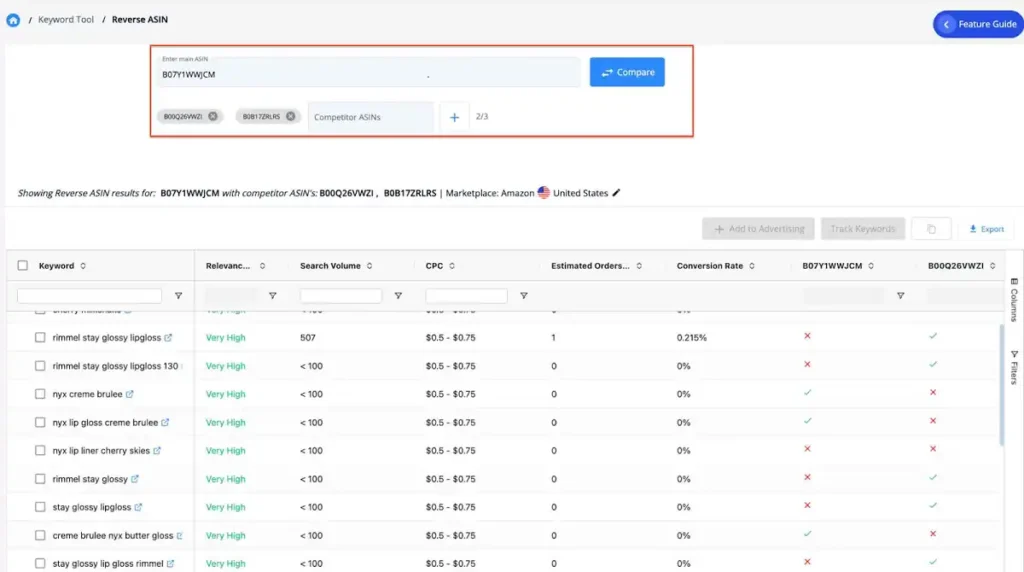
SellerApp’s Keyword Tracker
Suite pricing starts higher. Helium 10, whose Keyword Tracker follows organic and sponsored positions, lists its Platinum plan at $99 a month billed yearly, or $129 paid monthly. It only makes sense if you’ll use the rest of the platform, and I’d be honest with yourself about that. Paying suite prices for monitoring alone is the commonest overspend I see.
Amazon keyword rank tracking with Amazon’s own data
Amazon doesn’t offer a tool that tells you your organic position for a keyword. That’s why third-party trackers exist. But if your brand is in Brand Registry, Amazon’s own data answers a more useful question: how your products perform for each search term.
| Amazon report | What it shows | Who can use it |
|---|---|---|
| Search Query Performance (Brand Analytics) | For each search query: query volume, impressions, clicks, add-to-carts and purchases, for your brand or a single ASIN, against the whole market | Brand Representatives in Brand Registry with a Professional account |
| Amazon Search Terms report (formerly Top Search Terms) | The most searched terms, their search frequency rank, and the top 3 clicked products with click and conversion share | Same Brand Analytics access |
| Sponsored Products search term impression share | Your share and rank of ad impressions per search term | Advertisers, ads only, not organic |
Search Query Performance counts organic and Sponsored Products results on the search page, and its ASIN view shows the queries driving each product. In practice, I’d use it to choose which keywords to track, then use a rank tracker to watch your position on those few. Amazon says Brand Analytics data usually goes back three years.
ASIN tracking: price, BSR and Buy Box over time
“ASIN tracking” usually means following one product’s numbers over time rather than its keyword positions: price, Best Sellers Rank, stock and who holds the Buy Box. Keepa is the standard tool here. Its free version shows price history and sends price-drop or back-in-stock alerts, and Keepa Pro (€29 a month, or €290 a year on its site) adds sales rank history, units bought, Buy Box statistics by seller and offer counts.
My rule: track keyword rank for your own listings, and track ASIN history for competitors. Their price and rank moves explain more of your rank changes than most sellers expect.
Organic rank is not the same as BSR
This trips up more sellers than anything else on this page. I explain it on nearly every onboarding call. Best Sellers Rank measures unit sales inside a category. Organic standing measures where you sit for a single search phrase. They move independently, and a strong BSR alongside weak keyword visibility is common when most of your sales come from ads or external traffic.
Watch both. I keep them in separate columns for a reason. BSR tells you how you’re selling against the category. Search visibility tells you whether shoppers can find you unaided. We’ve audited accounts with an enviable BSR that ranked nowhere for their own product name, which is a fragile place to be.
A weekly tracking routine that takes ten minutes
Here’s the routine we run on client accounts, stripped to the essentials:
- Choose five target phrases per product. One primary, two secondary, two long-tail. Write them down so the list stops drifting.
- Check on a fixed day. Same day, same hour, incognito window. Consistency beats frequency.
- Record placement, date, and anything odd. Competitor out of stock, your own price change, a new review batch. Context now saves guesswork later.
- Note what you changed. Title edit, new main image, ad budget shift. Without this column, you can never attribute a movement to a cause.
- Review the trend monthly, not weekly. Look for direction across four readings. Anything shorter is noise.
I’ve found the “what changed” column is the one people skip and the one that eventually matters most. Six months in, it becomes a record of what actually worked on your catalog rather than what worked in someone’s blog post.
Five tracking mistakes worth avoiding
- Checking logged in. Amazon personalises results. Your own account will flatter you, so use incognito or a tracker that queries neutrally.
- Tracking too many keywords. Fifty phrases per product yields a spreadsheet nobody opens. Five gets read.
- Reacting to single-day moves. Positions bounce daily on inventory and ad activity across every competing seller. In our experience, nothing under two weeks of movement is a signal.
- Ignoring inventory. A stockout erases hard-won progress faster than any rival can, and recovery is slow. Log inventory beside placement, or the figures will mislead you.
- Measuring without editing. Tracking is diagnosis, nothing more. If nothing changes in the listing, the numbers just document a plateau.
What to do with the data
Tracking without acting is just watching a number move. When a phrase stalls for six weeks despite the effort, the listing is at fault, not the software.
Three places to look first, in this order.
Keyword research. Verify Amazon has indexed the phrase at all before optimizing for it. Lead with your strongest phrase in the title, put secondary ones in bullets, and park the remainder in backend fields. Tools like Helium 10 or Sonar give you the volume side, and your own search-term reports give you the truth. If you are still choosing software, we compared the listing optimization tools worth paying for.
Listing copy and images. Rank brings traffic. Conversion keeps it, and I’d fix conversion first every time. A leak-proof, double-walled, BPA-free bottle should say so in the first bullet, not the fourth paragraph.
A+ Content. Brand-registered sellers get richer modules, and better conversion feeds the same signals Amazon ranks on. Our A+ Content design service covers that side if you’d rather not build it in-house.
If you want the acting handled rather than the measuring, our listing optimization team does keyword research, copy, and images as one job.
FAQ
What is a good organic rank on Amazon?
The top three slots capture most clicks for any given phrase. Page one, roughly the top sixteen results, is where meaningful traffic starts. Below page two, organic traffic is close to zero no matter how much volume the keyword has.
How often should I check organic rank?
A weekly cadence suits most catalogs. Daily checks mostly capture noise, because results shift constantly with competitor stock levels, price changes, and ad activity you can’t see.
Does PPC affect organic rank?
Indirectly, yes. Ad sales count toward the velocity and conversion signals Amazon uses to rank organically, which is why launches usually run both together. Our guide to Amazon PPC campaign structure covers how to set that up without wasting spend.
Can I track a competitor’s organic rank?
Yes. Most software accepts a rival ASIN, and reverse ASIN tools reveal which keywords they rank for at all. Honestly, that comparison is more useful than staring at your own numbers in isolation.
What is ASIN tracking on Amazon?
Following one product’s data over time: price, Best Sellers Rank, stock and Buy Box ownership. Keepa’s free price history and alerts cover the basics, and paid tools add sales rank and Buy Box history.
Does Amazon have a keyword rank tracker?
Not for organic position. Brand Analytics’ Search Query Performance dashboard shows impressions, clicks and purchases per search term for registered brands, and the Sponsored Products impression share report covers ad positions only.
Are there free ways to track Amazon rank?
Hand-checking in a spreadsheet costs nothing, and several Chrome extensions offer basic free tiers. You lose history and alerts, which is exactly what the paid tools sell.
Last updated: October 15, 2026. Tool prices are as listed on each vendor’s site on that date and change often. Sources: Amazon, Search Query Performance; Amazon, Search Terms report; Amazon Ads, search term impression share; Keepa; Helium 10 pricing; Data Dive; Jungle Scout, keyword rank information.







