



The Amazon product detail page is the single page where a shopper decides whether to buy from you. Every product has one. Unlike a website you own, the structure is fixed. Amazon decides where each element sits. You decide only what goes inside.
That constraint is actually useful, because the work is finite. Roughly a dozen elements, each with a specific job. Know which drive the click and which close the sale, and you know precisely where to spend effort.
We optimize detail pages for client accounts constantly. In our experience this ranking holds up against real conversion data, and I’ve found sellers reliably invest in the wrong elements. So this guide walks each one, then ranks them by what genuinely moves numbers. The ranking may annoy you.

The elements, top to bottom
Brand name
Sits above the title and links to your Brand Store, if you have one. Small element. Two jobs: it signals legitimacy, and it hands interested shoppers a route to your other products. Available properly only with Brand Registry. Worth having for that alone? No. Worth having anyway? Absolutely.
Title
Your heaviest visible element, working two shifts. It appears in search results, deciding clicks. It appears atop the page, confirming the shopper landed correctly. Lead with product type and primary keyword, then the attributes buyers filter by.

Mobile truncates earlier than desktop. So your opening 80 characters carry nearly all the weight. Write them last, deliberately.
Reviews and ratings
Directly under the title, and largely beyond your control. That star rating shapes the click before anyone reads a word you wrote. Frustrating, and unavoidable. You earn this element rather than writing it, through product quality, the Request a Review button, and Amazon Vine for new products.
Variations
Size, color, count, and style selectors. Build the variation family correctly and browsers stay put rather than leaving to compare. Build it wrong, with mismatched variations or orphaned children, and you scatter your own reviews across separate listings. I’d call that among the most expensive mistakes to unwind on this platform.
Bullet points
Five slots. Each converts a feature into a reason to buy. That is the entire brief.
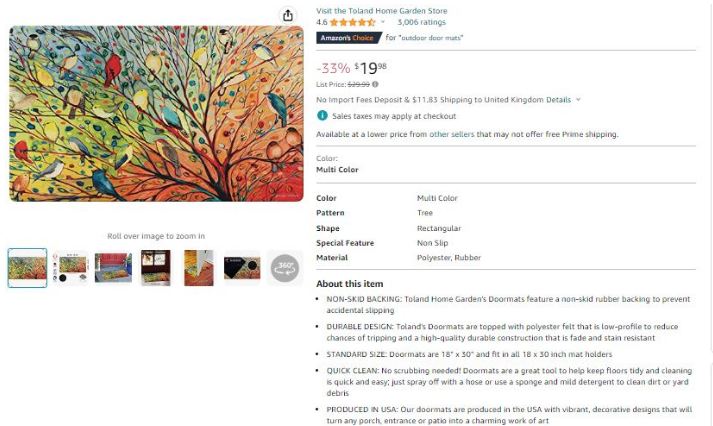
Shoppers scan rather than read. So front-load the benefit. One idea per bullet. Answer the objections that cause abandonment: sizing, compatibility, warranty, what is in the box.
Images
Up to nine slots, roughly seven visible. Use them all.
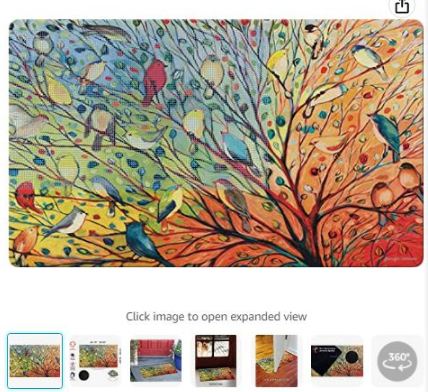
The main image decides your click-through rate from search. Everything after closes the sale: detail shots, scale references, lifestyle context, infographics carrying your top benefits for the majority who never read text. The technical floor: white background on the main image, 1000+ pixels so zoom works. That is compliance, not optimization.
Product video
Increasingly prominent in the carousel, and badly underused. A short demonstration answers what bullets cannot, and in our experience it repays production costs on any item whose use is not immediately obvious.
Price
More than a number. It positions you, and it feeds Buy Box eligibility. Monitor it against rivals rather than setting it once and forgetting.
Buy Box
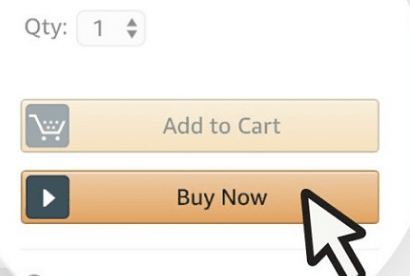
The add-to-cart panel, plus who the sale goes to. Where several merchants offer one product, Amazon awards this panel to a single winner based on price, fulfillment, and metrics. Lose it? Your ads stop serving on that ASIN and most sales vanish.
Description or A+ Content
Plain text for most sellers. A+ modules for brand-registered ones. Big difference.
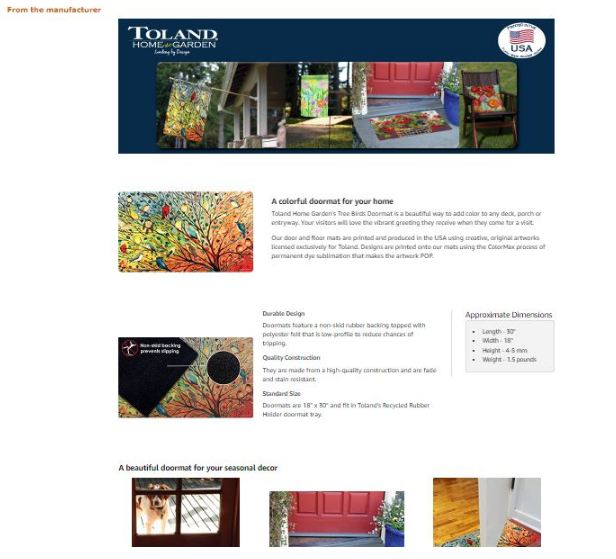
A+ replaces the paragraph with image modules, comparison charts, and brand story blocks, and it consistently lifts conversion in our client accounts. One caution: A+ body text indexes weakly, so never park your only mention of an important keyword there.
Customer questions and answers
Community-generated, and worth joining. Your replies embed genuine shopper language on the page and dissolve hesitation at the precise moment it strikes.
Related products and sponsored placements
Amazon packs the space around your content with rivals’ advertising and its own suggestions. You cannot remove any of it. That is a decent argument for running Sponsored Display defensively on your own pages.
What actually moves the numbers
Here is the ranking I’d give any seller asking where to start, because the page’s elements are emphatically not equal:
| Priority | Element | Why |
|---|---|---|
| 1 | Main image | Decides the click from search, multiplying everything downstream |
| 2 | Title | Drives both search eligibility and the click |
| 3 | Reviews and rating | Largest trust signal, slowest to change |
| 4 | Price and Buy Box | Gates whether you can sell at all |
| 5 | Image stack and video | Closes the hesitant buyer |
| 6 | A+ Content | Strong conversion lift where available |
| 7 | Bullets | Real effect, smaller than most sellers assume |
| 8 | Description | Matters mainly when A+ is unavailable |
Notice where bullets land. Merchants burn hours rewriting them while a weak main image sits above. Precisely backwards. I’d call it the most common misallocation in every audit we run. If the budget covers one professional upgrade, make it conversion-grade images.
Diagnosing a page that is not selling
Work from the funnel rather than guessing:
- Low impressions? A relevance problem, not a page problem. Fix keywords and the backend search terms first.
- Impressions fine, clicks low? Main image and price. Test a new main image properly, using Manage Your Experiments rather than changing and hoping.
- Clicks fine, sales low? Conversion elements: image stack, A+ Content, reviews, or a price that loses on comparison.
- Everything fine, then sudden collapse? Check the Buy Box first, then for a suppressed listing or a stockout.
One metric tells you which applies: unit session percentage in your Business Reports, your conversion rate per ASIN. I check it before touching anything.
Creating a detail page
For a product not yet in Amazon’s catalog: Inventory, then Add a Product, then create a new listing. You will need a product identifier (a GS1-issued UPC or EAN, or a GTIN exemption, as covered in our barcodes guide), the correct category, and every field the category template requires.
Fill the optional fields too. They power the filters and refinements shoppers use to narrow results, and an empty attribute means invisibility to anyone filtering on it. My candidate for the quietest mistake in new-listing setup.
If building and maintaining detail pages properly is the bottleneck, that is exactly what our expert listing service handles, images included.
FAQ
What is an Amazon product detail page?
The page where a single product is presented to shoppers, containing the title, images, price, Buy Box, bullets, description or A+ Content, reviews, variations, and Q&A. Every product on Amazon has exactly one, shared by all sellers offering that item.
Which part of the product detail page matters most?
The main image, because it decides whether shoppers click through from search results, and everything downstream depends on that click. Title comes second, then reviews and rating, then price and Buy Box.
How do I optimize an Amazon product detail page?
Work in order of impact: main image, then title and keywords, then the full image stack and A+ Content, then bullets. Diagnose first using impressions, clicks, and unit session percentage to identify which stage of the funnel is failing.
Can I change the Amazon product detail page layout?
No. Amazon fixes the structure and placement of every element, including competitor ads on your page. You control the content within each element, not the arrangement.
Why does my product detail page show another seller?
Because that seller currently holds the Buy Box, awarded on price, fulfillment method, and performance metrics. Winning it back usually means competitive landed pricing, Prime-eligible fulfillment, and healthy account metrics.
Do I need Brand Registry to optimize my detail page?
Not for titles, bullets, images, or price. Brand Registry unlocks A+ Content, Brand Store links, video in more placements, and stronger protection against unauthorized edits, all of which meaningfully raise the page’s ceiling.
Last updated: August 27, 2026. Amazon changes detail page elements and placement regularly; Seller Central’s style guides carry current requirements for your category.







