



To change the name on your Amazon seller account, go to Settings, then Account Info in Seller Central. Which name you are changing decides how hard this is: the display name customers see can be edited in minutes with no documents, while the legal business name and tax ID require documentation and Amazon’s verification, which takes days and sometimes stalls.
Most confusion around this task comes from mixing those three identities up, so I’ll separate them properly, walk the steps with screenshots, and answer what actually worries merchants: what happens to reviews, feedback, and Brand Registry afterward. Short answers: nothing, nothing, and it depends.
We manage accounts for clients, renames included, and I’ve shepherded enough of these through verification to know exactly where they snag. The warnings below come from those cases.
The three different “names” on a seller account
- Display name (storefront name): what buyers see next to “Sold by.” Purely cosmetic, editable almost freely, and unique across the marketplace (you cannot claim one another merchant already uses).
- Legal business name: the entity on your agreement. Tied to identity checks, payments, and tax records. Updating it means re-verification.
- Tax identity (EIN/SSN and tax interview): what the IRS (or your local authority) knows you as. Updated through a fresh tax interview with matching paperwork.
Rebranding usually needs only the first. A restructure, marriage, merger, or sale touches the second and third, and in my view those deserve real planning.
Why sellers change their name
- Rebranding. The storefront label no longer matches the brand you built. Editing the display name fixes this on its own.
- Business restructuring. Sole proprietor to LLC is the classic, and in my experience the most common reason merchants touch the legal entity at all.
- Mergers and acquisitions. Ownership shifts and the entity behind the account must be updated properly (more on that risk below).
- Personal legal changes. Marriage or a court-ordered rename flows through to the registered identity.
Changing your display name: the five steps
Step 1: Log in to Seller Central
Use your registered credentials and land on the main dashboard.
Step 2: Open Account Info
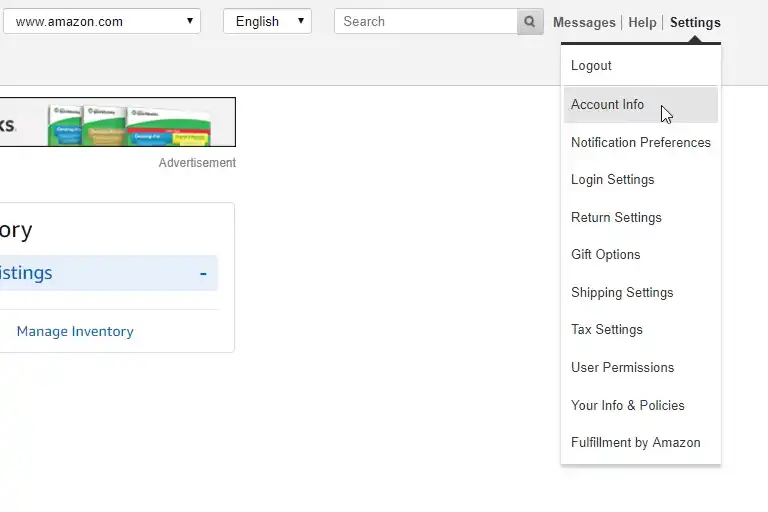
Click the Settings gear in the top-right corner and choose Account Info. This page holds everything editable about your identity on the platform.
Step 3: Find the store name
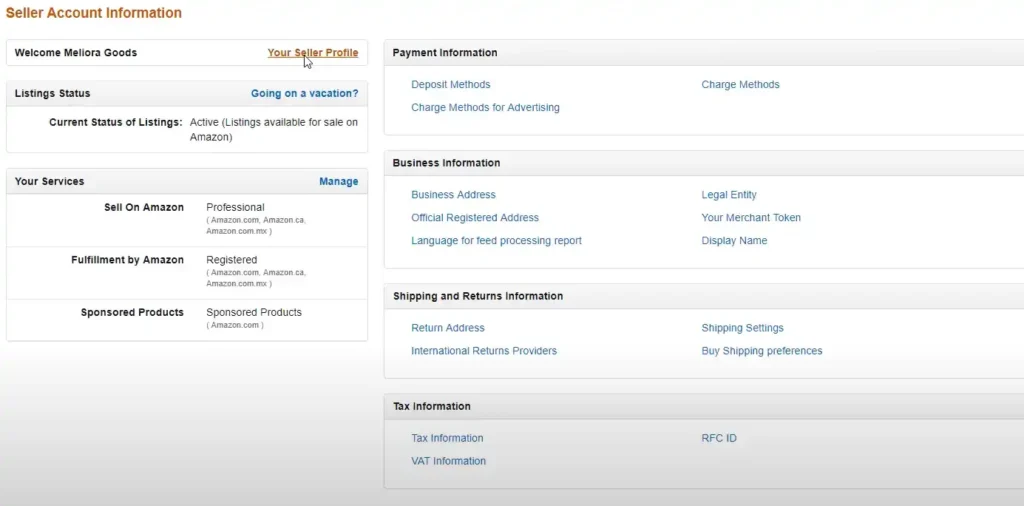
In the Your Seller Profile area, open Store Details and click edit next to your storefront name.
Step 4: Enter the new name
Type the new title. Amazon checks uniqueness; if another merchant holds it, you will need a variant. Keep it consistent with your brand everywhere else, because a storefront label that differs from your website and packaging quietly erodes trust. I have seen it happen with rebrands done in the wrong order.
Step 5: Submit
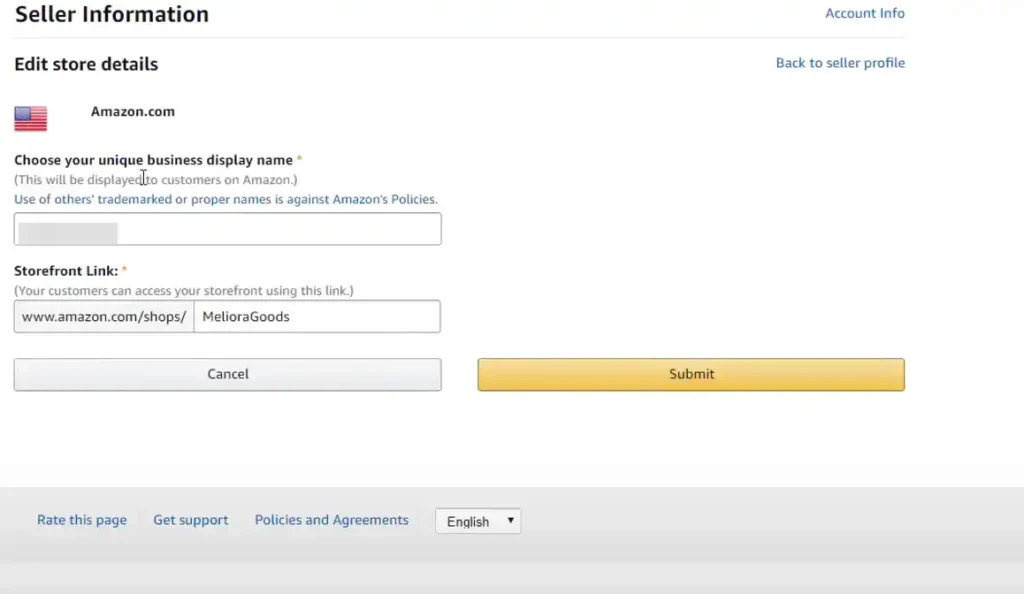
Display updates typically apply immediately or within a few hours. No documents, no review queue. Done. Honestly the easiest task in Seller Central.
Changing the legal business name or tax ID
This is a different animal entirely, and I’d block out a week rather than an afternoon.
Legal business name: from the same Account Info page, open the business information section and update the entity. Amazon will ask for supporting paperwork: registration or license, plus identity documents matching the new entity. Expect Seller Identity Verification to re-run, which can include document review and, in some cases, address or video verification.
Tax information: retake the tax interview (Account Info, then Tax Information) with the new details. Your W-9/W-8 data, EIN, and entity title must match IRS records exactly; a punctuation-level mismatch between “ACME LLC” and “Acme, LLC” can bounce the validation. My advice: copy from the IRS letter character for character.
Three practical warnings from cases we have handled:
- Do not let documents disagree. The most common stall I see is a license, bank record, and tax form spelling the entity three different ways. Align them before you touch Seller Central.
- Expect disbursement holds during verification. Amazon can pause payouts until the new identity clears. Plan cash flow around a possible one-to-two-week gap rather than being surprised by it.
- Changing the entity behind an account is not the same as selling the account. Amazon’s agreement restricts account transfers; a genuine change of ownership should go through Amazon’s process for it rather than quietly swapping the legal name. Done wrong, this pattern looks like account sale or takeover and can trigger a suspension that is slow to unwind. If the account is deactivated over identity issues, our guide to suspended seller accounts covers the recovery path.
What happens to reviews, feedback, and Brand Registry?
Product reviews: nothing. Reviews belong to the ASIN, not your name.
Seller feedback: nothing. Your feedback history and rating survive a storefront rename. Buyers simply see the new label on old feedback.
Storefront URL: your store’s underlying seller ID does not change, so existing links keep working.
Brand Registry: here is the one that catches people. Your brand name is protected by your trademark and registered separately from your seller name; renaming the storefront does not touch it. But if the rebrand includes a new brand name on products, that is a new trademark and a new Brand Registry enrollment, a much bigger project than this article’s topic.
Active listings and the Buy Box: unaffected by a storefront rename. Entity updates do not touch listings either, though a payout hold during verification is worth anticipating in Q4.
Choosing a display name you will not regret
Since you are already here renaming something, worth a paragraph on picking one that
lasts.
Avoid naming yourself after your first product. The commonest regret by a distance.
“BambooKitchenCo” reads beautifully while you sell cutting boards and awkwardly once half
your catalog is luggage. Breadth costs nothing at registration.
Avoid geography you might outgrow. Regional names quietly cap you. They also confuse
buyers who wonder whether you ship to them.
Check the name is free as a trademark before you grow attached. A storefront name you
cannot register is a storefront name you cannot defend, and Brand Registry is where that
bites.
Say it out loud. Names containing numerals, hyphens or creative spellings survive
badly in conversation, in podcasts, anywhere somebody has to repeat it from memory.
Keep it pronounceable and short. Shoppers do not read storefront names carefully. They
glance.
My own rule: choose a name that would still fit if your catalog doubled in an unrelated
direction, because the sellers who succeed tend to end up somewhere they did not plan.
Common mistakes to avoid
- Renaming mid-dispute or mid-surge. A switch during an A-to-Z spike or a viral moment confuses buyers checking who they bought from. Pick a quiet week. Always.
- Treating the storefront label as branding strategy on its own. If the rebrand matters, coordinate the storefront, brand store, packaging, and website together rather than renaming the account first and the rest “later.”
- Guessing at tax details. Copy from the IRS-issued document. Every mismatch costs a validation round-trip measured in days. I have watched a comma cost a week.
- Starting an entity update right before peak season. Verification holds and Q4 do not mix. We schedule these for clients in slow months, deliberately.
If account admin like this is exactly the work you want off your plate, it is part of what our account management service handles day to day.
FAQ
How do I change the legal name on my Amazon seller account?
Update it under Account Info, Business Information, then Legal Entity, and expect to
provide documentation showing the change: updated registration, an amended tax
document, or equivalent. Amazon re-verifies the account, which can take weeks, and the
account may be restricted during review. This is not the same as changing your display
name.
What business name should I use for my Amazon seller account?
The legal entity name must match your registration and tax documents exactly, since it is
verified rather than chosen. Your display name is the one buyers see and the one you have
latitude over, and I’d pick something that survives a change of product range rather than
naming it after your first item.
Can I change my Amazon seller business name without losing reviews?
A display name change keeps feedback and reviews intact. A legal entity change is a
verification event rather than a rename, so the risk sits in the account review it triggers
rather than in the review history itself.
How do I change my seller name on Amazon?
Go to Seller Central, then Settings, then Account Info, open Your Seller Profile, and edit the storefront name under Store Details. Display name changes need no documentation and usually apply within hours.
Does changing my Amazon seller name affect my reviews?
No. Product reviews stay with the ASINs and seller feedback stays with your account. Buyers will simply see your new name attached to the existing history.
How long does an Amazon seller name change take?
Display names update almost immediately. Legal business name and tax ID changes involve document review and re-verification, which typically takes several days and can pause disbursements until complete.
Can I use any name as my Amazon display name?
The name must be unique on Amazon, must not infringe someone else’s trademark, and must not contain misleading terms (like “Amazon” itself). If your preferred name is taken, you will need a variation.
What documents do I need to change my legal business name?
Business registration or license for the new entity, identity documents that match it, and updated tax records. Consistency is the whole game: every document should spell the entity identically before you submit.
Does a seller name change affect Brand Registry?
Renaming your storefront does not touch Brand Registry, which is tied to your trademark, not your seller name. Changing the actual brand name on your products, however, means a new trademark and a new enrollment.
Last updated: August 26, 2026. Seller Central menus and verification requirements change; the Account Info page reflects the current process for your marketplace.







